
What is a VPS: how it works and when you need one
What a VPS is, how virtualisation works, what you get with one and how to tell whether your site already needs it. Explained simply, without unnecessary jargon.

Your website is growing. Traffic is up, your shop is getting more orders, and during the busiest hours the pages start to load slowly. Someone tells you, "It's time for a VPS." It sounds technical and a little intimidating, and it isn't clear what exactly you get for the higher price.
In this article you'll learn what a VPS is, how it works, what you get with one and how to tell whether you really need it now or are better off waiting. No unnecessary jargon, and plenty of real-world examples.
In short
- A VPS is a virtual server: a slice of a powerful physical machine that works as a separate server just for you.
- The processor, memory and disk are guaranteed and aren't shared with other customers.
- You get full (root) access and choose the operating system and software yourself.
- You need one when your site outgrows shared hosting or needs custom settings.
- If you don't want to look after the server yourself, choose a managed VPS.
What is a VPS
VPS stands for virtual private server. It's a separate server that isn't a physical machine of its own. Instead, it's created with software on top of a larger, more powerful physical server. That machine is divided into several isolated virtual servers, and each of them runs completely independently.
To the user, a VPS looks and behaves exactly like a real server. It has its own operating system, its own IP address, its own users and its own settings. You can restart it, install whatever you need and configure it the way you like, without affecting the other virtual servers on the same machine.
The easiest way to picture it is with an everyday example. Shared hosting is like a dormitory: everyone lives in one big room and uses one kitchen, and if someone decides to cook at rush hour, everyone else has to wait. A VPS is like an apartment in a block of flats. The building is shared, but the apartment is yours alone, with its own door, its own keys and its own utility bills. Whatever your neighbour is doing, your kitchen stays free.
How a VPS works: virtualisation and the hypervisor
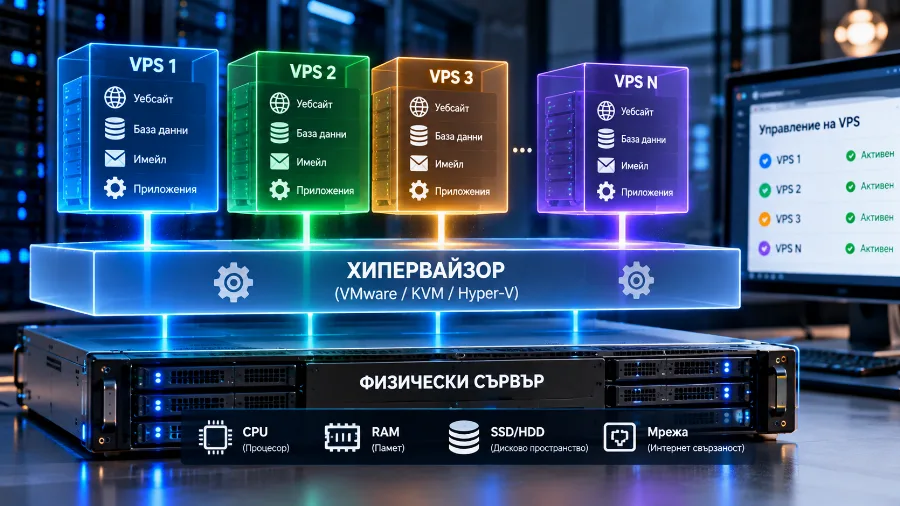
Behind every VPS is a technology called virtualisation. Special software called a hypervisor is installed on the physical server. Its job is to split the machine's real resources (processor cores, memory, disk space and network) into separate portions and give each portion to a separate virtual server.
The hypervisor also makes sure that no virtual server goes beyond its share. If your VPS has 4 GB of memory allocated, that memory is yours, no matter how busy the neighbouring servers are. It works the other way round, too: if your site gets a sudden traffic spike, it won't take resources away from other customers.
There are two main types of virtualisation you're likely to come across:
- Full virtualisation (for example, KVM). Each VPS has its own operating system kernel and behaves like a completely separate computer. You can install practically any system, including different Linux distributions or Windows. This is the most common and most flexible option today.
- Container-based virtualisation (for example, OpenVZ or LXC). The virtual servers share the kernel of the host system. They're lighter but also more limited: you can't change the kernel, and the choice of operating systems is narrower.
For a website, an online shop or a business application, full virtualisation is the safer choice, because it gives you real isolation and the freedom to set up the server exactly as you want.
What you get with a VPS
When you rent a VPS, you get resources and permissions that shared hosting either doesn't offer or limits heavily. Here are the main ones:
- Processor cores (vCPUs). Virtual cores that handle the requests to your site. The more you have, the more tasks the server can run at the same time.
- Memory (RAM). This is where the web server, PHP and the database run. Running out of memory is the most common reason a site slows down under load.
- Disk space. Room for your files, database, email and backups. The standard today is NVMe storage, which reads and writes data several times faster than ordinary SSDs and many times faster than old hard drives.
- Network and traffic. The connection speed and the amount of data the server can transfer each month. For most sites traffic isn't an issue, but if you serve a lot of images, video or downloadable files, it's worth checking the limit.
- A dedicated IP address. The server has its own address that isn't shared with other people's sites. This also helps with email, because the address's reputation depends only on you.
- Root access. Full administrator rights. You can install software, change any setting and manage the services running on the server.
- Your choice of operating system. Linux distributions such as AlmaLinux, Ubuntu and Debian are the most common, with Windows Server available when you need it.
On top of that, you can add a control panel if you'd rather manage your sites, email and databases through a browser than from the command line. A panel isn't required, but it makes day-to-day work much easier.
Why guaranteed resources matter so much
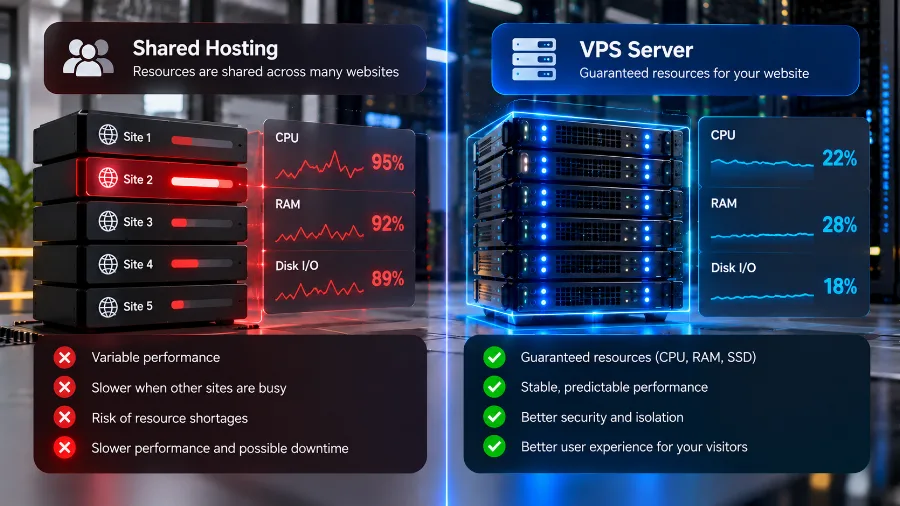
The biggest difference between a VPS and regular hosting isn't in the technical details. It's in predictability. On shared hosting, hundreds of sites use the same server. The provider sets limits for each account, but the machine's resources are still shared. If a neighbouring site comes under attack or runs a heavy task at the wrong moment, you may feel it too.
This problem even has a name: the "noisy neighbour". With a VPS it all but disappears, because your resources are reserved in advance. Your site behaves the same way at ten in the morning and at nine in the evening, on an ordinary day and on the day of your big sale.
Predictability also has a direct effect on SEO. Google measures how quickly a page loads and how stably its content is displayed through the Core Web Vitals metrics. A site that sometimes responds in half a second and sometimes in five loses both visitors and rankings. A stable server response time is one of the foundations of good rankings.
Where a VPS sits among the other types of hosting
If you line up the types of hosting by capability, a VPS sits in the middle. Below it is shared hosting: the most affordable and easiest to manage, but with shared resources. Above it is a dedicated server: an entire physical machine just for you, with maximum power, but also a higher price and less flexibility.
A VPS takes something from both worlds. You get isolation and guaranteed resources, much like your own server, without paying for a whole machine. You can also add resources as your project grows, usually without moving the site. If you're wondering which option suits your project, the VPS servers page compares the types of hosting and lists the plans with their exact resources.
If you're new to the subject, start with the article what is web hosting. It explains the main types of hosting and how hosting works in general.
When you need a VPS
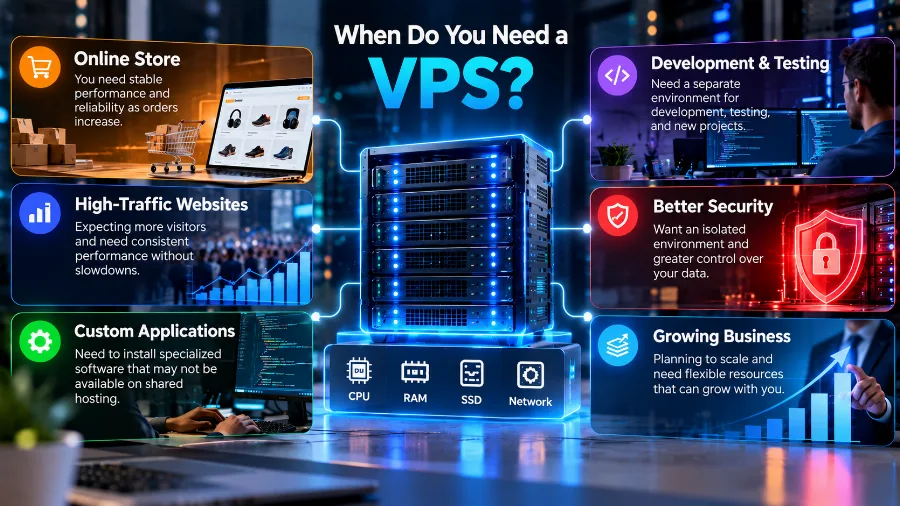
There's no exact number of visits after which you must move to a VPS. There are, however, clear signs that your site has outgrown its environment:
- The site slows down at busy times. Everything is fine in the morning, but in the evening pages take several seconds to load. This usually means you're hitting your account limits.
- You get errors during traffic peaks. A 508 error (resource limit reached) or a 503 error (service unavailable) during a campaign or a sale is a sure sign that the resources aren't enough.
- Your online shop is growing. The cart, payments and filters put far more load on the database than ordinary pages do. A shop with thousands of products and regular orders rarely feels at home on shared hosting.
- You need specific software. A particular PHP version, Node.js, Python, Redis, Elasticsearch or other software that shared hosting doesn't allow.
- You run several projects. Agencies and freelancers who maintain many client sites often prefer one VPS where they manage everything in one place.
- Isolation and security matter to you. When you handle personal data or payments, it's reassuring to know the server isn't shared with sites you know nothing about.
If you recognise at least two of these signs, it's probably time for a change. Before you decide, look at your hosting statistics for the past month: processor load, memory usage and the number of errors. The numbers usually show clearly whether the problem lies in the resources or in the site itself.
When you don't need a VPS yet
A VPS isn't the better choice for everyone. For many sites it's an unnecessary expense and an unnecessary responsibility. If you run a personal blog, a small business site with a few pages or a new project that's still building an audience, well-configured shared or WordPress hosting will serve you perfectly well.
You'll save money, and the provider will take care of security, updates and backups. If your site runs on WordPress and you want more speed without looking after your own server, read the article on how to choose WordPress hosting. Plenty of sites run for years without ever needing more.
A good rule of thumb is to move to a VPS when you see a specific problem, not "just in case". A slow site at peak times, errors under load or software you can't install: those are the real reasons.
What to know before you get a VPS
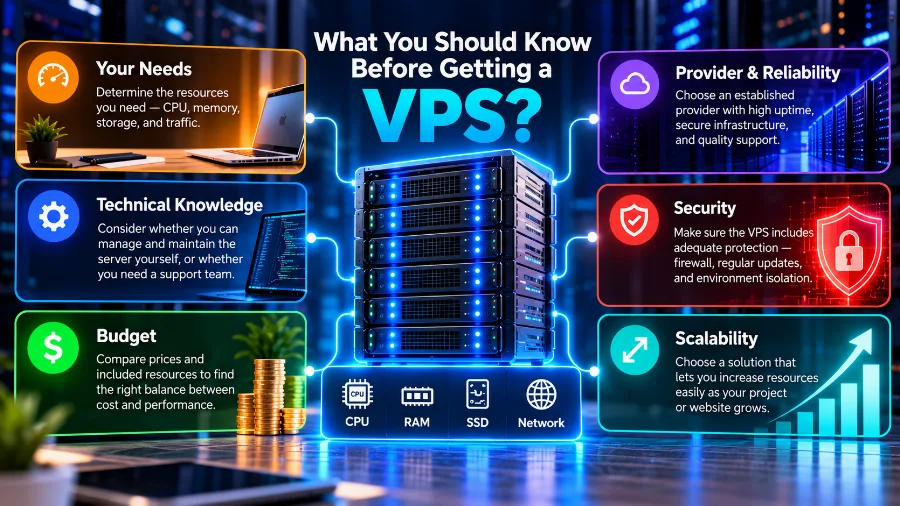
A VPS gives you freedom, but also responsibility. With an unmanaged VPS, the provider supplies a working virtual machine and the network, and everything else is up to you:
- installing and configuring the web server, PHP and the database;
- regularly updating the operating system and software;
- the firewall, protection against break-in attempts and server monitoring;
- backups, and checking that you can actually restore the site from them;
- responding when something stops working at two in the morning.
All of this takes basic Linux skills, working over SSH and an understanding of how web servers work. If you have them, an unmanaged VPS gives you the most control for your money.
If you don't have the time or the wish to become a system administrator, there's an easier option. With a managed VPS you get the same guaranteed resources, but the hosting team takes care of setup, updates, security and monitoring. You focus on your site and your business, not on the server.
What else a VPS is used for
Most people rent a VPS for a website or an online shop, but it's a general-purpose server and can do much more:
- Web applications. Booking systems, CRMs, internal tools, and Node.js or Python applications that need a process running around the clock.
- A staging environment. A separate server where developers try out new versions before releasing them on the main site.
- Your own mail server. For companies that want full control over their email. If you simply need an email address on your own domain, there's an easier route, described in the article on how to create a business email.
- A VPN for your team. A secure connection that lets employees reach company systems while they're away from the office.
- Automation and bots. Scripts that run on a schedule, collect data or send notifications.
- Game servers. Minecraft, for example, where isolated resources keep the game running smoothly.
How to choose your first VPS
When you compare offers, don't look only at the price and the number of gigabytes. These are the things that really make a difference:
- Whether the resources are guaranteed. Some providers sell more resources than the machine actually has, counting on customers not to use them all at once. Look for explicitly guaranteed cores and memory.
- The type of disk. NVMe drives are much faster than ordinary SSDs, and the difference is especially noticeable with databases.
- Where the data centre is. If your visitors are in Bulgaria, a server in Bulgaria means shorter response times. A difference of a few dozen milliseconds adds up with every request.
- Easy upgrades. Check whether you can add cores and memory without moving the site to a new server.
- Backups. Whether they're included, how often they run and how easy it is to restore a site from them.
- Support. How quickly the team responds and in which languages. When something goes down, this matters more than anything else.
If you're moving from shared hosting, your site needs to be transferred to the new server. The process is the same as with any change of host and is described in detail in the article on how to migrate a website to a new host.
Frequently asked questions
What does VPS stand for?
VPS stands for virtual private server. It's virtual because it's created with software on a physical machine, and private because its resources and settings belong to you alone.
Are a VPS and a VDS the same thing?
In practice, yes. VDS (virtual dedicated server) is another name some providers use to stress that the resources are fully reserved for the customer. What matters isn't the name but whether the cores and memory are truly guaranteed.
Do I need to know Linux to use a VPS?
For an unmanaged VPS you do, at least at a basic level. If you don't have those skills, choose a managed VPS or a VPS with a control panel that lets you manage your sites from a browser.
Can I host several websites on one VPS?
Yes. One VPS can serve many sites, as long as there are enough resources for all of them. That's why it's a popular choice for agencies and companies with several projects.
Is a VPS more secure than shared hosting?
The isolation is better, because the server isn't shared with other people's sites. Security also depends on maintenance, though: an outdated, poorly configured VPS is more vulnerable than well-maintained shared hosting. That's why, with an unmanaged VPS, updates and protection are your responsibility.
Will my site be faster on a VPS?
If the slowness comes from a lack of resources, yes, and the difference is usually noticeable. If the cause is a heavy theme, too many plugins or unoptimised images, a more powerful server alone won't solve the problem. It's best to find out where the slowdown comes from first.
Conclusion
A VPS is your own server inside a larger machine, with guaranteed resources, full control and the freedom to install whatever you need. It's the natural next step when your site outgrows shared hosting, but it isn't a step everyone has to take. Choose one when you have a specific reason. And if you don't want to look after the server yourself, leave that work to your host with a managed VPS.
Has your site outgrown shared hosting? Choose a VPS with guaranteed cores and memory, and a site that runs just as fast at any hour.