
What is a subdomain and when to use one
What a subdomain is, how it works, how it differs from a domain and a folder, when to use one, how to create it and how it affects SEO.

You've seen addresses like shop.company.com, blog.company.com or mail.company.com. The part on the left, before the company name, isn't a separate domain that someone has bought. It's a subdomain: a free extension of your domain that you create yourself and use for a separate part of your website or for a completely different service.
Subdomains are convenient, but they aren't always the right choice. Sometimes an ordinary folder on your site does the same job better, especially where Google is concerned. In this article you'll learn what a subdomain is, how it works, how it differs from a domain and from a folder, when it's worth using one, how to create it and which mistakes to avoid.
In short
- A subdomain is a part to the left of your domain, such as shop.company.com. You create it yourself, for free and without a separate registration.
- It can point to the same server or to a completely different one, such as a VPS, an online shop or an external service.
- For a shop, a customer portal or a test version, a subdomain is convenient. For a blog and language versions, a folder is usually the better choice for SEO.
- Forgotten subdomains are a common security hole. Delete the ones you no longer use.
What is a subdomain
A domain is read from right to left. In the address company.com, ".com" is the extension and "company" is the name you registered. Anything you add on the left, separated by a dot, is a subdomain. In shop.company.com, the subdomain is "shop".
You'll sometimes see it written as "sub-domain" too; it means exactly the same thing. An interesting fact is that the familiar "www" is technically a subdomain as well. It's just so widespread that most people don't think of it that way.
The key point is that you don't buy a subdomain. Once you have a domain, you can create as many subdomains as your hosting or DNS service allows, without paying anything to the registrar. They live and die with the main domain: if it expires, all its subdomains disappear too.
How a subdomain works
Each subdomain is a separate record in DNS, the system that translates names into server addresses. When someone opens shop.company.com, the browser asks DNS where exactly that address is and gets an answer independent of the one for company.com.
That's the big advantage. The main website can be on shared hosting, the shop on the subdomain can be on a VPS and the booking system can run at an external service. To the visitor, it all looks like one whole, because it carries your name. Behind the scenes, though, each part can run in a completely different place.

Technically, a subdomain is pointed somewhere with two types of record. An A record points directly to the server's IP address. A CNAME record says "this subdomain is an alias for another name" and is used when a service gives you an address instead of an IP. You can read more about records and how DNS connects names to servers in our article on what DNS is.
Subdomains on several levels
A subdomain can have a subdomain of its own. An address like test.shop.company.com is perfectly valid: "test" is a subdomain of "shop", which in turn is a subdomain of company.com. The technical limit is high, but in practice it rarely makes sense to go deeper than one or two levels.
Every extra level makes the address longer, harder to remember and more complicated to maintain. On top of that, a wildcard certificate for *.company.com only covers the first level, meaning shop.company.com but not test.shop.company.com. For deeper levels you'll need a separate certificate. So unless you have a clear reason, keep the structure flat: test-shop.company.com often does the same job more simply.
Subdomain, domain and folder: what's the difference
These three are the most common source of confusion. Here's how they differ in practice:
| Type | Example | Separate registration | Can be on another server | How Google sees it |
|---|---|---|---|---|
| Domain | company.com | Yes, paid yearly | Yes | A standalone website |
| Subdomain | shop.company.com | No, it's free | Yes | Often as a separate website |
| Folder | company.com/shop/ | No | No, it's on the same server | Part of the main website |
If you'd like to understand in more detail what a domain itself is made of and how it's chosen and registered, see our article on what a domain name is.
When to use a subdomain
A subdomain makes sense when a part is technically or conceptually separate from the main website. Here are the most common cases:
- An online shop on a separate platform. The company website runs on one system and the shop on another. The address shop.company.com keeps them under one name without mixing them.
- A customer portal. A customer login, a support system, bookings or invoices, usually at addresses like my.company.com or support.company.com.
- A test version. On test.company.com or staging.company.com you try out changes before releasing them on the real site.
- A web application. If you have software that customers use in the browser, app.company.com clearly separates it from the marketing website.
- Email and technical services. Addresses such as mail.company.com or webmail.company.com, as well as server addresses that aren't meant for visitors.
- Separate units or projects. When a company has completely different lines of business that deserve standalone websites, but under the shared name.
A simple rule helps you decide: if the part runs on a different system, has a different audience or is maintained by a different team, a subdomain is the natural choice. If it's just more content for the same visitors that should lead them to your services, it belongs in a folder on the main site. When in doubt, ask yourself whether this part could exist as a completely standalone website. If the answer is yes, a subdomain will suit it well.

When a folder is the better choice
There are cases where a subdomain looks logical but actually does harm. The best-known one is the blog. If your articles live on blog.company.com, Google often treats them as a separate website. The authority the blog builds up with every good article and every external link doesn't fully help the main site, and vice versa.
If the same articles are at company.com/blog/, everything builds up in one place. Every shared article strengthens the whole domain, including your service pages. That's why, for a blog, guides and a knowledge base, a folder is almost always the better choice.
The same goes for language versions. A version at company.com/en/ is easier to maintain and shares the main site's authority, while en.company.com starts almost from scratch. Subdomains for languages only make sense when the versions are so different that they're really separate websites.
Subdomains and SEO
Google officially says it can handle both subdomains and folders. In practice, though, a subdomain is more often treated as a separate website, with its own history, its own rankings and its own quality signals. That's neither good nor bad in itself. It's a question of what you're trying to achieve.
If you want a part to rank on its own and not depend on the main site, a subdomain is a good fit. If you want everything to work together and support each other, choose a folder. Either way, link the parts to each other so it's clear they belong together.
There's also an often-overlooked danger: test subdomains. If test.company.com is open to search engines, Google may index a copy of your website. Two almost identical versions then appear in the results and get in each other's way. Protect test subdomains with a password, or at least block them from being indexed.
How to move a blog from a subdomain to a folder
If your blog is already on a subdomain and you want the benefits of a folder, moving it is entirely possible. The important thing is not to lose the rankings your articles already have.
- Move the content. Copy the articles into a folder on the main site, for example company.com/blog/, keeping the titles and text.
- Set up 301 redirects. Every old address on the subdomain should lead to the exact new address of the article, not just to the home page. This tells Google the page has moved permanently and passes on the authority it has built up.
- Update internal links. Links in the menu, in other articles and in emails should point directly to the new addresses.
- Let Google know. In Search Console, add the new sitemap address and keep an eye on the indexing reports for a few weeks.
- Don't delete the subdomain straight away. Leave the redirects running for at least a year, until search engines and other websites have updated their links.

A temporary dip in traffic after a move is normal. If the redirects are accurate, rankings usually recover within a few weeks and then grow along with the main site.
How to create a subdomain
The method depends on where your domain is managed and where the subdomain will run.
Through your hosting control panel
If the subdomain will be on the same hosting as the main site, this is the easiest route. In the control panel, find the subdomains section, enter the name, for example "shop", choose the main domain and confirm. The panel creates the folder for the files and the necessary DNS record itself. A few minutes later the subdomain is working.
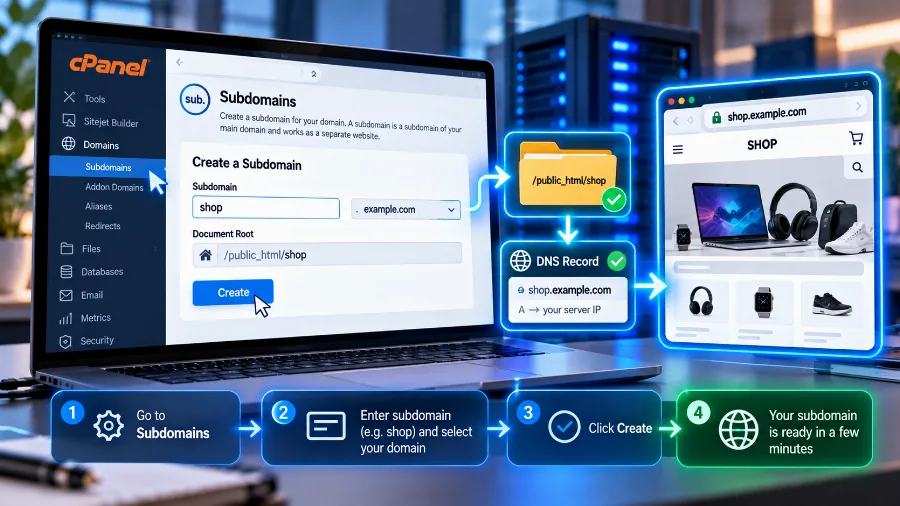
How many subdomains you can create depends on your hosting plan. Some entry-level plans don't include subdomains at all, while larger ones offer dozens. Check this in advance if you know you'll need several.
With a DNS record
If the subdomain needs to point to another server or an external service, open your domain's DNS settings and add a record:
- An A record, if you have an IP address. For example, shop with the IP address of your VPS.
- A CNAME record, if the service has given you a name instead of an IP. For example, support pointed to the address your support system has given you.
The new record usually starts working within an hour, and sometimes within 24 hours, as it propagates around the world. After that, don't forget to add an SSL certificate for the subdomain too.
SSL certificates for subdomains
Every subdomain that opens in a browser needs its own secure connection. The certificate for company.com doesn't automatically cover shop.company.com. If the subdomain has no certificate, the browser will show a warning and visitors will leave.
There are three ways to solve this. Most hosts issue a free certificate for each subdomain automatically. You can also use a certificate that covers several names at once. The third option is a so-called wildcard certificate, which covers all first-level subdomains with a single entry, such as *.company.com. It's handy when you have many subdomains or create them often.
A subdomain for email campaigns
A less well-known but very useful application is sending newsletters and bulk emails from a subdomain, such as news.company.com. Mail providers judge the sender's reputation. If bulk campaigns go out through the main domain and one of them gets flagged as spam, the reputation of the whole domain suffers. Then even ordinary emails to customers start landing in spam.
When campaigns go out through a separate subdomain, the risk stays isolated there. The main domain keeps a clean reputation for everyday correspondence. The campaign subdomain needs its own sender authentication records, but that's set up once and then works on its own.

A free subdomain instead of your own domain
Some free website platforms give you an address like yourcompany.platform.com. That's also a subdomain, but not of your domain; it belongs to someone else's. It looks like a convenient start at no cost, but it has serious drawbacks.
The address is long and hard to remember. Customers see it as unprofessional. You can't set up business email with it. And most importantly, everything you build up on Google belongs to someone else's domain. If you ever decide to move, you start from scratch, and the platform can change its terms or shut the service down.
Your own domain costs little per year, and it stays yours for as long as you renew it. If you don't have one yet, check whether the name you want is available. The subdomains of your own domain are then free and very flexible.
Mistakes to avoid
- Forgotten subdomains. An old test installation on a subdomain that nobody updates is an easy target. A breach through it often affects the whole hosting account. We describe what happens then in our article on hacked websites.
- Records pointing to services that no longer exist. If you've stopped using an external service but the CNAME record for the subdomain is still there, someone may claim the same spot at that service and show their own content under your name. Delete the records along with the services.
- A blog on a subdomain out of habit. Unless you have a specific technical reason, put the blog in a folder.
- A test site open to Google. Protect it with a password, or you risk duplicate content in the results.
- Missing SSL. Every subdomain that opens in a browser needs its own certificate.
Frequently asked questions
Is a subdomain the same as a sub-domain?
Yes. Both spellings mean the same thing and are used interchangeably.
Do you have to pay for a subdomain?
No. You only pay for the main domain. You create subdomains yourself, and how many you can have depends on your hosting or the DNS service you use.
Can a subdomain be on different hosting?
Yes. You simply point the subdomain in DNS to the IP address or name of the other service. The main website stays where it is.
Is a subdomain or a folder better for SEO?
For content you want to strengthen the main site, such as a blog or language versions, a folder is usually the better choice. A subdomain suits parts that are separate in purpose or technically.
Can a subdomain have its own email?
Yes. You can create addresses like office@shop.company.com, but the subdomain then needs its own mail records in DNS. In most cases it's simpler for all staff to use addresses on the main domain.
How long can a subdomain be?
Each part between the dots can be up to 63 characters, and the whole address up to 253. In practice, the shorter the subdomain, the better.
Conclusion
A subdomain is a free and flexible way to separate part of your online presence without buying a new domain. Use it for a shop on a separate platform, a customer portal, an application or a test version. For a blog and language versions, choose a folder so everything works together on Google. And don't forget the housekeeping: SSL for every subdomain, a password for test ones and deleting the ones you no longer need.
Don't have your own domain to create subdomains under yet? Check whether the name you want is available and secure it before someone else does.